Gather ’round, young’uns and hear this tale. Way back in the Dark Ages, we’d be called on to support all kinds of wacky environments. One bane of our existence was trying to connect a “PC” monitor to a Mac. There weren’t any established standards then like we have today (e.g. HDMI). VGA was a thing but there were several “types” of VGA. And then DVI came around and made it even worse. As a field tech, I used to carry a little leather travel bag full of video adapters, ADB-to-serial adapters, SCSI adapters, and more.
One fine Autumn afternoon, I was sent on a call to set up a new B&W G3 Mac at a magazine publisher. It was there that I met “Doug”. Friends, let me tell you about Doug. Anyone who has worked in tech for any amount of time knows a Doug. See, Doug fancied himself a knowledgeable “tech” person and, like vegans everywhere, he would let you know it, whether you wanted to hear it or not. Doug was so excited to share his tech knowledge with an actual Apple field technician. The problem was that while he had some tech knowledge, it was all surface-level or you could tell that he had read about something and then repeated it without really understanding it. “Have you heard about Apple’s new iTools? I can’t wait to use them to fix my common problems.” – or – “PowerPC is a great architecture; it’s going totally fix all the problems with little-endian strings.” Insert #eyetwitch emoji.
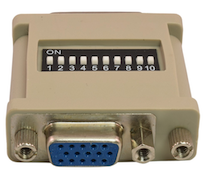 Doug wanted help setting up his new huge Sony Trinitron CRT display. Apparently he had tried, but couldn’t make it work so he called for help. I immediately saw the problem — in trying to replicate the setting from his previous display, he had kept the DIP Switch adapter from the previous monitor in place instead of just plugging the display’s new DVI cable directly into his video card. He had actually included a DVI-to-VGA-adapter and was trying *double* adapt down from DVI to VGA to DIPSwitch Mac/PC adapter. I started to explain, “See, you don’t need this adapter. Your old monitor was from a typical PC monitor and that adapter helped set the VGA settings so it could be used on the Mac. This new monitor uses DVI and your video card in your B&W G3 (I pointed it to the DVI port) has native DVI. You can just plug the cable directly into this port.”
“But I paid a lot of money for that adapter!“, says Doug, incensed. “The guy at CompUSA sold it to me said it would be necessary!”
I shook my head. “Your Comp USA guy doesn’t know what he’s talking about. Let’s try it.”
Of course it worked. And DVI provided a better refresh rate and more resolutions. Win win, except for the DIPshit advisor at Comp USA. I don’t know if Doug got his money back.